Here I begin my final blog posting of my graduate studies. This internship has been one that has pushed me to do things that I otherwise would not have had the drive to attempt, and I am so grateful for the "push" from both my college instructors and supervisors.
Last week I attended a grant writing workshop with helped me get a feel for what was expected of me when writing my robotics/S.T.E.A.M. grant. I am very passionate about the project and I have spent many hours refining it to show the need of the program at our school. This grant is something that concludes my internship, but also opens doors for me as well. I am so excited to use what I learned about technology integration to help others learn and succeed!
Monday, May 7, 2018

Sunday, April 29, 2018
Week 14
This week was very exciting and began with finding out that Schorlemmer Elementary made the paper for robotics!

This picture was taken back when Schorlemmer Elementary first accepted the grant in the amount of $4,000 to go toward purchasing a robotics "laboratory." It was super exciting as it marked the beginnings of my internship. It's crazy how much has been accomplished since that day!
This week also presented setbacks as mentioned in my previous post. I was to attend a grant writing workshop on my campus this past Tuesday but was unable to due to unforeseen circumstances. Thankfully I will be attending the workshop this Tuesday, and care has been taken so that there are not any problems this time around.
One of the highlights this week was receiving our newest classmate, Samuel the Corn Snake!

He was a great extension to our ongoing "Pesky Pythons" S.T.E.A.M. project and served as a learning opportunity for students to learn the difference between venomous and nonvenomous snakes. Quite a few of my students got the opportunity to hold "Sammy" and face any fears or misconceptions they had of snakes.
This week students continued to use technology to research pythons as an invasive species in Florida, as well as in math stations. It is amazing how well technology has been integrated into our day-to-day activities. When it becomes second-nature for students to quickly grab a kindle when conducting an activity, you know that the marriage of technology and education has been successful.
Can't wait to share my next week of adventures with you!
Wednesday, April 25, 2018
Week 13
This past week was pretty exciting, and students got to participate in a really neat STEAM activity I found in the book I mentioned in the previous post. This week students continued to post and respond to posts on Seesaw. I now have a few parents who are connected to Seesaw and are able to see their child’s learning. Students also finished taking the survey from the previous week and I received some very informative results that you can view by clicking here
As mentioned above, I found a STEAM activity titled "Pesky Pythons." As the name describes students are asked to research pythons as an invasive species in the state of Florida. Students used computers, kindles, and books to conduct research on snakes, pythons in particular. Students absolutely loved having this time to research on their own in collaborative groups! In the end groups will create a powerpoint presentation to present their findings.

This past week students also used Quizizz and Kahoot to review for Monday’s Social studies benchmark. Students really enjoy mixing and matching the two quiz sites and I have already seen results showing that it helps with their understanding!
I also spent this past week working on writing my grant. Due to unforeseen circumstances the grant writing workshop had to be rescheduled for May 1st.
This post is a little later in the week than usual, but it's been a crazy week! I look forward to sharing more ways our class is integrating technology into our learning!
Sunday, April 15, 2018
Week 12
While this week consisted of STAAR testing, cancelled field trips, and district-wide network outages, work still needed to be done when it came to technology integration. I purchased the following book titled "STEAM Design Challenges" which I had a chance to read up on while students were testing. STEAM stands for Science, technology engineering, art, and math and this book contains student-centered project-based activities which are perfect for after testing. The first activity we are going to engage in is titled "Pesky Pythons" and is a research-based activity which has students designing a powerpoint presentation.

Students also participated in a survey to assess their engagement with using the Seesaw online journaling application. I created the survey using Typeform. You can view the survey here:https://jordanh3.typeform.com/to/sWN9LpThe survey gave me a look into how the students thought of online journaling, peer collaboration, and the use of a rubric with journaling. While not all of my participating students have completed the survey, I have received very interesting data that gave me a look at how the students really felt about Seesaw. Below is a screenshot that gives you a sample of the data collected:


While more passive, this week was also a week of Seesaw responses to posts. Students posted pictures of our Board Game/ Movie day, and parents that were connected had the opportunity to view posts from their own child.


Next upcoming week will be interesting, as I will be taking a grant writing class as I begin writing my grant to receive funding for Robotics at our campus! I look forward to sharing my experiences with you soon!
Saturday, April 7, 2018
Weeks 10 and 11
But these past weeks weren't just about math. My class participated in a virtual lab investigation where they got to create working circuits. Students really enjoyed the activity and used Seesaw to share their reflections with their classmates. The greatest benefit of completing a virtual circuit lab was that students could safely find out what happens if the circuit was overloaded, which caused the batteries to catch fire. This use of a virtual lab showed one of the benefits of technology integration in the science classroom - students could take risks, manipulate their works in ways they would normally not be able to do safely in a real lab environment.

Example student reflection page

Student designing then sketching a complete circuit.
Below is the link to the virtual lab:
https://phet.colorado.edu/en/simulation/circuit-construction-kit-dc-virtual-lab
Monday, March 26, 2018
Week 9
This past week included both the integration of technology into the classroom, as well as hours spent preparing for my graduate comprehensive exam. To prepare for my exam, I reviewed concepts pertaining to Psychological Foundations in curriculum, more specifically the constructivist theory and its applications in the classroom. Also in review was augmented reality, which I have gained a sparked interest in. I hope to be able to incorporate augmented reality into a math station soon to help motivate students as we prepare for the upcoming STAAR test.
This week students continued working on their robotics projects, and, due to a change in stations, students were given an opportunity each day to refine their math computation and fluency skills using two great programs: Reflex Math and Prodigy Math.
Reflex math is a program that I wrote a grant for and received for free for a year. It is an amazing program that works on building students' math fluency. Students create an avatar and play different games as they build their fluency. Their goal each day is to reach their "green light," which means they have successfully completed a lesson in Reflex for that day.
 www.explorelearning.com
Prodigy Math is a program that I am new to having my students use, but am already in love with. Like Reflex, students create an avatar and then travel about a virtual world defeating monsters and leveling up. Students can collect special clothing items and weapons. Teachers can log in and collect data to assess student math performance. Best of all, it's free!
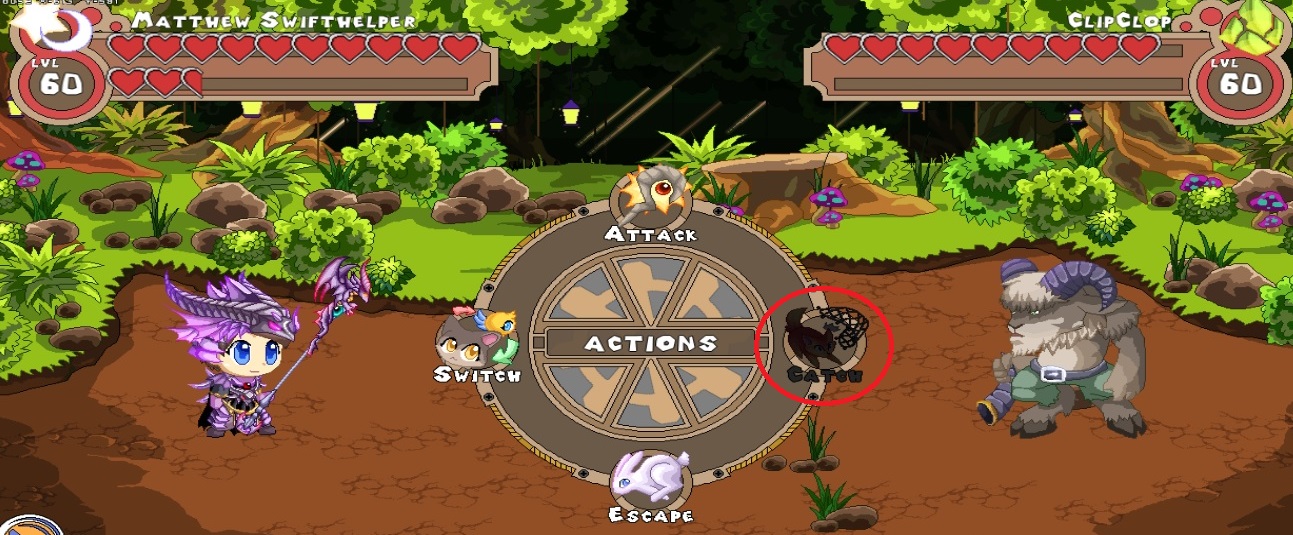
This week students continued working on their robotics projects, and, due to a change in stations, students were given an opportunity each day to refine their math computation and fluency skills using two great programs: Reflex Math and Prodigy Math.
Reflex math is a program that I wrote a grant for and received for free for a year. It is an amazing program that works on building students' math fluency. Students create an avatar and play different games as they build their fluency. Their goal each day is to reach their "green light," which means they have successfully completed a lesson in Reflex for that day.
Prodigy Math is a program that I am new to having my students use, but am already in love with. Like Reflex, students create an avatar and then travel about a virtual world defeating monsters and leveling up. Students can collect special clothing items and weapons. Teachers can log in and collect data to assess student math performance. Best of all, it's free!
This upcoming week we plan on going back to our Seesaw lessons, hopefully finishing and having students become "Seesaw Certified."
Monday, March 19, 2018
Week 8
While I spent Spring break out of the classroom, I found plenty of time to work on my research and learn more about technology integration. I started the week by viewing a webinar by Istation that discussed the challenges with integrating technology into the classroom. You can find the webinar here:
https://www.edweek.org/ew/webinars/education-technology-webinars.html?override=web
The rest of the week I continued working on research, adding newly attained survey data from a recent technology survey. I had sent a request for the survey a few weeks ago and finally was given access to the results. It contained data that further showed a need for technology in the classroom and helped with giving purpose to both my research and internship.
I also used this time away from the classroom to review for my upcoming Comprehensive exam. I viewed both videos and research that related to AR in education and industry. Below are a few of the sources I viewed:
Aug That!
https://www.youtube.com/watch?v=kg3CcaAgnUM
Using Aurasma and Powerpoint to create educational AR experiences
https://www.youtube.com/watch?v=pEVKtPEcgQg
AR in industry (Index AR Solutions)
https://www.youtube.com/watch?v=qMEJnYKpwog
Caterpillar AR for inspection
https://www.youtube.com/watch?v=S8jMgBimuxg
Air measure app
https://www.youtube.com/watch?v=S8jMgBimuxg
I tried out the Air tape measure app and it was amazing how accurate it was! It combined virtual reality with reality as it created a virtual tape measure to measure real objects. Best of all the application was free! I would like to do more research and see if there is such an app available for the kindle. How neat would it be to have students measure objects at their desk with a virtual tape measurer? Or measure objects that would otherwise be very difficult to measure, such as floor to ceiling or from one side of the room to the other?
I also viewed videos and research that related to learning theory of constructivism and how it shapes curriculum. The resources are below:
Constructivist Approaches
https://www.youtube.com/watch?v=krqjqGIuC-A
Article on Learning Theories in Education Technology
https://www.scribd.com/document/342240877/Foundations-of-Curriculum
Breakout Session #1: Constructivist Inquiry-Based Teaching and Learning
https://www.youtube.com/watch?v=Sk-RdlAahXc
Aug That!
https://www.youtube.com/watch?v=kg3CcaAgnUM
Using Aurasma and Powerpoint to create educational AR experiences
https://www.youtube.com/watch?v=pEVKtPEcgQg
AR in industry (Index AR Solutions)
https://www.youtube.com/watch?v=qMEJnYKpwog
Caterpillar AR for inspection
https://www.youtube.com/watch?v=S8jMgBimuxg
Air measure app
https://www.youtube.com/watch?v=S8jMgBimuxg
I tried out the Air tape measure app and it was amazing how accurate it was! It combined virtual reality with reality as it created a virtual tape measure to measure real objects. Best of all the application was free! I would like to do more research and see if there is such an app available for the kindle. How neat would it be to have students measure objects at their desk with a virtual tape measurer? Or measure objects that would otherwise be very difficult to measure, such as floor to ceiling or from one side of the room to the other?
I also viewed videos and research that related to learning theory of constructivism and how it shapes curriculum. The resources are below:
Constructivist Approaches
https://www.youtube.com/watch?v=krqjqGIuC-A
Article on Learning Theories in Education Technology
https://www.scribd.com/document/342240877/Foundations-of-Curriculum
Breakout Session #1: Constructivist Inquiry-Based Teaching and Learning
https://www.youtube.com/watch?v=Sk-RdlAahXc
Today I was back in the classroom, and while it is good to be back, it was nice having this time to focus on professional development and further understanding how to integrate technology into the classroom.
Monday, March 12, 2018
Week 7

This was the week before Spring Break, and what says break time more than benchmarks all week? We spent most of the week either administering benchmarks or being in "testing mode," but amidst all the testing we still found time for technology integration in the classroom.
Students finished up writing their reflections from previous week and worked in collaborative groups, supporting learning objectives for my internship. Students were also introduced to the drawing tool in Lesson 8 of the Seesaw Learning application. Students are one step closer to getting "Seesaw Certified." In this lesson students worked in collaborative groups to create a life cycle of their choice. Students then had to use the microphone, captions, or labels to explain their drawing.
Students also used the drawing tool to demonstrate an understanding of math concepts. We were learning about data, so we decided to draw dot plots. After I modeled how to create a dot plot using the kindle, students then were given a set of numbers and told to plot them on a dot plot of their making.

Students used a combination of the text tool and drawing tool to create their dot plots. I could have extended the activity further by having them write 2-3 sentences about their dot plot, or having them write questions that could be answered with their dot plot.
Students finished their online STEM virtual investigation on topic of lifecycles. While I had two students control the animations and read the instructions, the rest of the classmates went through the scientific process in their journals and came up to the interactive whiteboard to interact with the investigation. The virtual investigations are very engaging for my students, and I have noticed that they are retaining the information at a better rate versus reading from a textbook.
We did not have too much time for robotics this week, but I did meet with one small group at a time to go over reflections. Both groups of students are participating in meaningful learning that is getting me excited for more technology integrated activities. Tech has become such a big part of our classroom environment.
I also took some time to work on putting together my research, which is showing how online journaling/blogging increases engagement, promotes peer collaboration and improves literacy skills. I have already gathered qualitative data that supports my research, and when it comes to improving literacy skills, students are recording their voices, stopping mid paper, and revising/ editing their papers. Hearing their papers read aloud by themselves is definitely making students more conscious of their writing.
I also took some time to work on putting together my research, which is showing how online journaling/blogging increases engagement, promotes peer collaboration and improves literacy skills. I have already gathered qualitative data that supports my research, and when it comes to improving literacy skills, students are recording their voices, stopping mid paper, and revising/ editing their papers. Hearing their papers read aloud by themselves is definitely making students more conscious of their writing.
Now its time to enjoy a week of Spring Break! I look forward to updating you after the break with how our class is further integrating technology into our classroom!
Sunday, March 4, 2018
Week 6
This past week was very productive and helped me move closer to my goal of integrating technology into my campus. This week my intervention students received their robotics folders to help organize their work. Students were told expectations and shown the robotics rubric. Students were given time to begin a Blockly assignment with Dash robots and began tracking their progress using their assignment organizer. My homeroom continued with Seesaw Lesson 5. I continued assisting students with taking a photo of their work and encouraged peer collaboration. We also discussed appropriate/not appropriate photos to use on Seesaw.
My campus recently expressed concerns about behavior, which made me think of an application titled Class Dojo- an app used for behavior management. Students receive weekly reports, and the system is very positive. My hope is that the data I have been collecting since September will show administrators the effectiveness of the technology application in reinforcing positive behavior.
This week I had my supervisor observe my robotics group– While my students continued working on their robotics assignment, my supervisor spoke shared with me information about Lego Robotics as well as Presentation software titled “Spark.” I am hoping to utilize Spark at the end of the semester as a way for my students to present what they learned about robotics to the group.
Our class began Seesaw Lesson 6, where students set and recorded their goals on paper. The class was introduced to the rubric that they would use to self-assess their writing. Students were shown a writing example that was read aloud. The teacher then went over the steps for taking a photo, tapping the microphone, and reading the story. Students were given five minutes to brainstorm their “5th Grade Goals.” After the brainstorming period students were given a 15-minute silent writing period. The teacher then went over the steps for taking a photo, tapping the microphone, and reading the story.
This week was definitely rubric-focused. My robotics students were introduced to the journaling rubric that they would refer to when writing reflections on programming sheet. Students continued working on projects, teacher recorded student progress into Seesaw in the form of video that students could leave feedback on.
I reviewed with my homeroom students the rubric that they would use to self-assess their writing. Students then took snapshots of their writing using the Kindles and uploaded the work to Seesaw. Students then added their voice to their posts. Students were then asked to use the rubric to assess the quality of their post.
0:45
Students continued to post their goals to Seesaw, taking pictures of their writing and recording their voice to go with the image.
During Science I had my students self direct themselves through an interactive whiteboard virtual investation about life cycles. Students wrote scientific method in journals and drew and labeled pictures as they were guided through a smart board lesson controlled and read by their peers. Students were asked to come up to the board several times to interact with Mimio smartboard.
We had "Read Across America Day" on friday, and I had the students scan QR codes with their Kindles in order to trigger a read-aloud of a Dr. Seuss story that they then listened to with their book buddy. Students then used the technology to helped their buddy take Accelerated Reader (AR) tests over the books read. I also discussed with technology teacher website code.org. She was unfamiliar with the website, which features self-guided modules that teach students to code.
On Saturday, I proctored and judged junior high and high school optics examinations. While stressful, it was a really exciting experience, and I also helped with operations of a Smart Board used during the testing period. I had a chance to work directly under three physics professors and was even able to provide assistance as to how incorporating a tablet into a lecture would be more engaging for students.
I also did a bit of research this week. I viewed a pre-recorded presentation titled “Ask an Expert: Programming and Team Management” by First Lego League. I also researched STEM activities for Read Across America, April. https://littlebinsforlittlehands.com/egg-drop-activity-stem-challenge-young-kids/. Finally I reread chapters “Social Media and Education,” Sound educational design using social media,” and “Common aspects of social media functions and practice” from the textbook Using Social Media in the Classroom by Megan Poore.
This week was long, but very productive. I look forward to continuing to research and continue activities with my students that will go toward my internship.
Saturday, February 24, 2018
Week 5
This past week the robotics group grew from 10 students to 15 students, meaning new procedures and expectations were to be put into place. The good thing about the change was our work space went from a closet down the hall to my classroom, making it easy for students to get to their robots and make the most of what precious time we have for intervention. Students were introduced to a rubric they would be using to rate themselves on their programming performance. Students were also given checklists and a troubleshooting guide to help them take charge of their learning.
Students were also introduced to the reflection sheet that will be used weekly or biweekly in order to reflect on that day or week's programming. I have not yet decided if I wanted this to be a weekly or biweekly task, but I do know that I am going to have my groups post onto Seesaw weekly with a summative reflection. My groups have already used Seesaw to write their goals for robotics and the rest of their fifth grade year.
Our group also was able to get two more devices, so now our classroom has 8 kindles (one is an older kindle that does not run the Wonder or Blockily applications but does connect to the internet), 4 desktop computers and 2 laptops. This makes it so much easier for our classroom to seamlessly integrate technology into our curriculum and keeps students from having to wait for a device.
I read up on a Case Study involving the Dash and Dot wonder robots. The challenge presented in the study mirrors my own objective for robotics: to "inspire students to participate in programming and other technologies; while improving student motivation and engagement" (Segiet, 2016). This case study helped put into perspective what exactly I was trying to achieve with my Dash and Dot robots. In the case study, the researcher was also wishing to start a coding club for the following school year, making the research and findings very relatable and relevant to my own internship and studies. You can find the PDF to the case study below:
http://wonderworkshop.sunburst.com/ww_case-study1.pdf
Students were also introduced to the reflection sheet that will be used weekly or biweekly in order to reflect on that day or week's programming. I have not yet decided if I wanted this to be a weekly or biweekly task, but I do know that I am going to have my groups post onto Seesaw weekly with a summative reflection. My groups have already used Seesaw to write their goals for robotics and the rest of their fifth grade year.
Our group also was able to get two more devices, so now our classroom has 8 kindles (one is an older kindle that does not run the Wonder or Blockily applications but does connect to the internet), 4 desktop computers and 2 laptops. This makes it so much easier for our classroom to seamlessly integrate technology into our curriculum and keeps students from having to wait for a device.
I read up on a Case Study involving the Dash and Dot wonder robots. The challenge presented in the study mirrors my own objective for robotics: to "inspire students to participate in programming and other technologies; while improving student motivation and engagement" (Segiet, 2016). This case study helped put into perspective what exactly I was trying to achieve with my Dash and Dot robots. In the case study, the researcher was also wishing to start a coding club for the following school year, making the research and findings very relatable and relevant to my own internship and studies. You can find the PDF to the case study below:
http://wonderworkshop.sunburst.com/ww_case-study1.pdf
Sunday, February 18, 2018
Week 4
This week was a little difficult when it came to getting my internship hours in. Fifth grade had back-to-back benchmarks on Monday and Tuesday, and Wednesday was our Valentine's parties. Thursday, however, we were back on track and I had the chance to meet with both my robotics group and my homeroom group to continue our Seesaw lessons.
Today I put the power of programming back into the students' hands as they worked together to navigate through the learning modules on the Wonder Workshop application. Our first programming session was a teacher-guided lesson on nested loops using the Blockly app, so this was a different approach that students had not yet had a chance to discover.
Through trial and error, and by seeking help of fellow "programmers," the students continued to surprise me with how quickly they worked through the modules, as well as how they were able to customize the modules to make them their own as they also fulfilled the tasks at hand. It was very rewarding to sit back and watch as they problem-solved and helped each other through some difficult steps in the programming process.
However, as much as we are having with programming, the STAAR test is lurking just around the corner. I am going to begin using Quizziz on the Kindles to help this group of students refine their knowledge of content before they are able to continue with the learning modules on Wonder. Students will still be getting to program as well as receive refinement along the way.
My home room also got to work with Seesaw a little this past week as well. This past Thursday students completed lesson 6, which had them post a selfie to Seesaw that included positive words about themselves. Students really enjoyed seeing their posts projected on the board as I approved their comments. Students also enjoyed helping out eachother and bringing eachother up as they encouraged their classmates to take selfies.
Today I put the power of programming back into the students' hands as they worked together to navigate through the learning modules on the Wonder Workshop application. Our first programming session was a teacher-guided lesson on nested loops using the Blockly app, so this was a different approach that students had not yet had a chance to discover.
Through trial and error, and by seeking help of fellow "programmers," the students continued to surprise me with how quickly they worked through the modules, as well as how they were able to customize the modules to make them their own as they also fulfilled the tasks at hand. It was very rewarding to sit back and watch as they problem-solved and helped each other through some difficult steps in the programming process.
However, as much as we are having with programming, the STAAR test is lurking just around the corner. I am going to begin using Quizziz on the Kindles to help this group of students refine their knowledge of content before they are able to continue with the learning modules on Wonder. Students will still be getting to program as well as receive refinement along the way.
My home room also got to work with Seesaw a little this past week as well. This past Thursday students completed lesson 6, which had them post a selfie to Seesaw that included positive words about themselves. Students really enjoyed seeing their posts projected on the board as I approved their comments. Students also enjoyed helping out eachother and bringing eachother up as they encouraged their classmates to take selfies.
Saturday, February 10, 2018
Week 3 - Jumping into the technology
Week three of my internship has been a very productive one. The week starting by me introducing my home room students to SeeSaw, a journaling application that puts students in control of their own personal E-portfolio. This week students got to watch me model posting and taking pictures on SeeSaw, along with learning about "Netiquette." I was also able to meet with my GT/TPSP group and introducing them to their Dash and Dot robots they will be programming with for the remainder of the school year.
This week was very exciting for both myself and my students. On Thursday I received Whispercast training so I can have access to and control of applications downloaded onto our Kindles. I also ordered a Amazon charging tower to help manage charging of the kindle devices. With Benchmarks next week I am looking forward to intervention time as I continue to use technology to help the students interact with their learning and eachother.
This week was very exciting for both myself and my students. On Thursday I received Whispercast training so I can have access to and control of applications downloaded onto our Kindles. I also ordered a Amazon charging tower to help manage charging of the kindle devices. With Benchmarks next week I am looking forward to intervention time as I continue to use technology to help the students interact with their learning and eachother.
Saturday, February 3, 2018
Week 2- Getting the ball rolling
Now that I have been given the okay to start piloting robotics, it is time to make sure that the technology that I have will work for the project. I was at a standstill with the Kindles, since I did not have the ability to download the required applications needed to program the robots. This week my supervisor delivered the loaner robots we would be using for the pilot, which of course was very exciting. There would be enough for groups of 2 and 3 to work together collaboratively with the robots.
Now for getting our devices on board to launch. I contacted our district's technology coordinator, who signed me up for Whispercast training and gave me permissions to download apps onto not only the kindle fires in my classroom, but in the entire school.
This opened up doors that went beyond robotics. See, the school purchased Kindle Fires a few years ago, but did not have anyone trained to best use them. Thus, their academic use was limited, so much so that books could not be downloaded for them (the main reason for their purchase). Now that there was someone on campus who knew how to set up the Kindles for academic use, students could get the most out of these tools.
I also got the chance to introduce one of the students who will be involved in the project to Jackson, one of the Dash robots. I handed her a Kindle Fire with the Wonder app downloaded, and let her experiment. In five minutes the student was wandering the halls with the robot at her heels as she manually controlled Jackson with the Kindle. When she showed my school's administration, the realization that our Kindle Fires were going to work for the project made them excited; this put much more room in our budget to purchase actual robots, instead of having to worry about devices to operate them.
I plan on introducing the robots to my Pilot group late next week, and I can't wait to share our experiences!
Sunday, January 28, 2018
Internship and Research - The Beginnings
With the holidays over and this new semester underway, it is time to begin my last semester as a grad student at UHV. I am very excited for the opportunities I have been given and look forward to the new experiences to come.
As far as my internship goes, I had some ideas as to what my internship would entail. I had gone to a staff development early January where I was introduced to BreakoutEDU, a program that puts learning and problem solving back into students' hands. This is where I met my Internship supervisor, who was giving the training. I was very interested in trying out Breakout at my school, but did not have the funds to purchase the physical "Breakout Box" and programs. While the physical "breakout box" was not yet within reach, Breakout did have a digital component that had free Breakouts that I definitely will try this semester. More on that later.
It was my first week back from Winter break that a wonderful opportunity was presented to me. My administration informed my fifth grade team that we had been offered a grant in the amount of $4,000 to jumpstart Lego Robotics at our campus. After seeing my interest and knowing that this was the semester of my internship, they let me take the lead on the project.
Along with the Lego Robotics opportunity to integrate technology into the classroom, I also planned to jumpstart blogging in my classroom, particularly with the subject of science. Fifth grade takes a Standardized test on science, and their scores on the test is dependent on a well-rounded grasp of the concepts and applications. After speaking to my supervisor I plan to use the free blogging platform Seesaw.
Throughout this semester I will journal my experiences with integrating technology into the classroom, and will be conducting research on the effects of blogging on collaborative learning, literacy, and achievement in the fifth grade science classroom.
I look forward to sharing my experiences with you!
As far as my internship goes, I had some ideas as to what my internship would entail. I had gone to a staff development early January where I was introduced to BreakoutEDU, a program that puts learning and problem solving back into students' hands. This is where I met my Internship supervisor, who was giving the training. I was very interested in trying out Breakout at my school, but did not have the funds to purchase the physical "Breakout Box" and programs. While the physical "breakout box" was not yet within reach, Breakout did have a digital component that had free Breakouts that I definitely will try this semester. More on that later.
It was my first week back from Winter break that a wonderful opportunity was presented to me. My administration informed my fifth grade team that we had been offered a grant in the amount of $4,000 to jumpstart Lego Robotics at our campus. After seeing my interest and knowing that this was the semester of my internship, they let me take the lead on the project.
Along with the Lego Robotics opportunity to integrate technology into the classroom, I also planned to jumpstart blogging in my classroom, particularly with the subject of science. Fifth grade takes a Standardized test on science, and their scores on the test is dependent on a well-rounded grasp of the concepts and applications. After speaking to my supervisor I plan to use the free blogging platform Seesaw.
Throughout this semester I will journal my experiences with integrating technology into the classroom, and will be conducting research on the effects of blogging on collaborative learning, literacy, and achievement in the fifth grade science classroom.
I look forward to sharing my experiences with you!
Sunday, December 10, 2017
DGL vs Gamification
At first I had trouble with the difference between digital based learning (DGL) and gamification in regard to education. However, after doing some reading and thinking about how my own school incorporates technology into learning, the differences between the two education program types became clear. The examples I will be using are Istation, a DGL program, and Reflex Math, a program I would categorize under “Gamification”. Istation is a program that we use K-5 to assess students’ reading and math skills. The program saves educators a lot of time by having students take multiple assessments digitally and collecting data. The program is research-based and proven effective. According to research, “istation Reading Curriculum manages student data and provides teachers with timely access to continuously revised data through skill and progress reports on individuals and groups of students”(istation Reading Curriculum Supplemental Reading and Intervention Program, 2004). This type of program is different from a game in that, while the program changes and adapts according to the students’ needs, the students are not in control of the content – they merely interact with what is presented to them. The students complete assessments through Istation and practice skills that are presented. The next program, Reflex Math, is what I would classify under “Gamification.” Measles & Abu-Dawood (2015) define gamification as something that “integrates game elements into educational content to promote motivation and engagement” (p. 809). Educational games have been used in the classroom to make learning more enjoyable to students who are used to the stimulation of video games. When students interact with Reflex Math, they have control over many of the elements, such as the appearance (they can change their avatar), the games they play, and how they spend virtual currency that they earn while playing the program. The authors of the article Gamification: Game –Based Methods and Strategies to Increase Engagement and Motivation within an eLearning Environment (2015) note that, “Gamification is not an easy to create because it requires deep thinking about the whole learning experience rather than focusing on the elements solely” and that “Well designed gamified content can be engaging and enhanced motivation because they tap into the cognitive, the emotional, and the social areas of the players” (O’Donovan, Gain, & Marais, 2013; Kapp, 2012, as cited by Measles & Abu-Dawood, 2015). Students have fun interacting with Reflex Math, which is something that separates it from Istation learning; while students may be engaged by animations produced by Istation, it is not a game they are playing. Much like practicing spelling words may be enjoyable for some, or completing a “mad minute” with math facts, it is different from a game where the student is in control. In my opinion, there are distinct differences between DGL and Gamification. While engaging students in different ways, I believe that both are equally important tools to use in the classroom for increasing and monitoring student learning. Measles, S. & Abu-Dawood, S. (2015). Gamification: Game –Based Methods and Strategies to Increase Engagement and Motivation within an eLearning Environment. In D. Rutledge & D. Slykhuis (Eds.), Proceedings of SITE 2015--Society for Information Technology & Teacher Education International Conference (pp. 809-814). Las Vegas, NV, United States: Association for the Advancement of Computing in Education (AACE). Retrieved November 10, 2017 from https://www-learntechlib-org.ruby.uhv.edu/p/150094/.https://www.istation.com/Content/downloads/whitepapers/ISResearch.pdfx
x
Kahoot
When I saw this tool listed as one of the social media tools to explore I had to use it as the focus of my post. I went to a training a few years ago where Kahoot was featured as a tool to get students excited about learning, while at the same time receiving a pre-assessment of whatever content is being focused on. I currently use a similar app called "Quizizz" in my classroom that serves to help students review before a test or to simply reinforce concepts. I remember now, after seeing the name again, how fun Kahoot was when I participated in a demonstration at a training. The way information is presented to the learner keeps you engaged and, while it is comparable to Quizizz, the organization of materials seems to make the learning more engaging. I believe it will be beneficial for my students if I rotate between Quizizz and Kahoot to keep the presentation of information fresh and engaging.

Click the image above to visit Kahoot and view the "What is Kahoot!?" video.
Tuesday, November 21, 2017
GoNoodle
I recently began reading and contributing to GoNoodle.com's blog page and came across an article titled 200+ GoNoodle Lesson Hooks. For those that are not familiar with GoNoodle, this is an interactive site that delivers "brain breaks" for students. The site features lots of free to use content and some paid content, and gives teachers and students a tool to wake up, help with focus, or relax; whatever their current need.
The article discusses how the engaging brain breaks can be used not only to keep students engaged, but also to introduce lessons. I have noticed while using GoNoodle such activities as "Body Spell" and other academically-based videos. The author of the post breaks down these videos into categories so that one can see which video would work best for what lesson, whether it be an introduction to the water cycle, or a review for a spelling test. On the website, it is hard to know what specific video would work well with the current lesson, and I like how this post eliminates guesswork. I will definitely use this post as a tool for choosing my brain breaks!
http://blog.gonoodle.com/2017/10/200-gonoodle-lesson-hooks/
The article discusses how the engaging brain breaks can be used not only to keep students engaged, but also to introduce lessons. I have noticed while using GoNoodle such activities as "Body Spell" and other academically-based videos. The author of the post breaks down these videos into categories so that one can see which video would work best for what lesson, whether it be an introduction to the water cycle, or a review for a spelling test. On the website, it is hard to know what specific video would work well with the current lesson, and I like how this post eliminates guesswork. I will definitely use this post as a tool for choosing my brain breaks!
http://blog.gonoodle.com/2017/10/200-gonoodle-lesson-hooks/
Tuesday, November 7, 2017
Cognitive Learning Theory
Chapter four of our readings discusses the cognitive school of thought, which consists of two important ideas that help us "understand how people learn and remember: information processing and meaningful learning" (p. 86). Cognitivists try to understand how learning happens and how information goes from short term memory to long term memory. So how does the cognitivist theory relate to technology integration?
I enjoyed reading about how to get learners to pay attention and focus on content. In my classroom, while we complete quite a bit of group work, I do have a direct teach piece where students are asked to listen and follow along. I am constantly finding ways to engage my students throughout the day to avoid them "checking out".
According to Coombs & Bhattacharya (2017), "A smart learning environment is dynamic, active and adaptive to the learners needs whilst relative to the process of achieving the desired learning outcomes associated with an overt curriculum task" (p. 308). I try to provide my students with a learning environment that is ever changing, never boring, but also highly structured. I utilize a powerpoint during my lesson and alternate between it and projecting my information using a document camera. I believe this combination of technology helps keep my information from becoming static and risking "check-out" from my students. I also make sure to have students discuss critical thinking questions to break up the lesson as well.
One way that I break up the school day is through Brain Breaks using the website GoNoodle. Averaging about 2-3 minutes in length, I have the students stand up, participate with the short video, and then sit back down to continue working. I believe this helps them regain their focus so that they can continue to learn.
I also make sure to schedule activities that require much mental effort in the morning. When students first come to me they have math and language arts. After lunch comes intervention then social studies and science. This schedule tends to work out well since my students' favorite subject is science. I am sure to integrate technology such as my Mimio to give my students a different, novel approach to learning.
The text also mentions "To forestall forgetting new information, we must manipulate it or, as cognitive scientists say, engage in active 'rehearsals' with it" and "reviewing information fixes it more firmly" (p. 89). I have students complete time math fluency sheets daily to improve their math facts. I also have students participate in Reflex Math, a drill and practice program for learning mathfacts and improving fluency. According to Coombs & Bhattacharya (2017), "digital tools that assist such higher-order internalized critical thinking and learning can also be described as a learning and knowledge technology, or, learning technologies that assist in the production of new knowledge" (p. 306). The program is solving and has students engaging in problem solving as they navigate through different games. By exposing students to this information daily, information is more likely to enter their short term memory and hopefully go into long term memory.
References
Coombs, S. & Bhattacharya, M. (2017). Smart Learning requires Smart Thinking: The
Evolution of Sustainable Learning Environments. In J. Dron & S. Mishra (Eds.), Proceedings of E-Learn: World Conference on E-Learning in Corporate, Government, Healthcare, and Higher Education (pp. 303-313). Vancouver, British Columbia, Canada: Association for the Advancement of Computing in Education (AACE). Retrieved November 8, 2017 from https://www-learntechlib-org.ruby.uhv.edu/p/181201/.
Wednesday, November 1, 2017
Venti and Refill
The chapter “Venti” in the Socially Networked Classroom
covers the use of social media in the classrooms, as well as touching upon
hybrid classrooms being used in a progressive-thinking high school. I have heard of the “flipped classroom”
concept, where students learn and view a lecture from home and come to school
to participate in a “workshop” style setting where the teacher is there for
support but is not lecturing.
What really resonated with me in this chapter was the
creative process teachers were taking when it came to project based learning. A teacher named Liz believed “strongly in the
use of role playing” and had students using “blogs and wikis” which allowed for
a “multimodal platform for that kind of roleplaying” (p. 101). Being in a public
fifth grade classroom, it is hard to keep students’ attention and keep them
engaged in learning. At this moment I am
doing a lot more direct teach than I would like (I have a particularly
unfocused and low performing group), but I would eventually like to switch to
project-based learning where students are taking charge and I am simply a guide
for their learning. I am thinking about
slowly introducing this kind of learning in the form of “stations” into my
science and social studies lessons, where I will have some of my students at
their seat working while the rest are on Kindles and computers completing a
virtual activity. This chapter really
got me thinking about how I need to begin rethinking my classroom
instruction.
The chapter “Refill” is the concluding chapter in the
Socially Networked Classroom. I have really enjoyed this book with its practicality
and readability. The chapter concludes
with a thought about Web 2.0 and its implications in the classroom. It speaks of how there is a concern that
technology integration can be “too much fun” and take away from the educational
aspect of learning (p. 118). However, technology
integration can simply be recording students’ poetry instead of having them
write it, having learning and technology mesh together in a natural way.
One big takeaway from the chapter was the issue of time – is
there enough time in our day to implement and integrate new media into our
classroom schedule? The chapter speaks
of questions educators ask about technology integration, such as the time it
takes to teach tutorials and make sure the students know how to use the
tools. It suggests, instead, that
teachers spend less time teaching students the tools and give the students
chances to give each other tutorials. The chapter closes with a pondering about
whether some teachers are ready to adapt new literacies into their curriculum,
or if they prefer to fall back on the “filing cabinets” taking up space in
their room. Comfort is not always a good
thing, and the text teaches how important it is to take risks, to step out of
our comfort zones, and to make learning an exploration for both students and
teachers alike.
Subscribe to:
Posts (Atom)